
Mazda 6 Service Manual: Instrument cluster removal/installation
Caution
- When replacing the instrument cluster, the configuration procedure must be performed before removing the instrument cluster. If the configuration procedure is not performed before removing the instrument cluster, it is possible that the instrument cluster will not operate normally.
1. Configurate the instrument cluter (when only replacing it). (See INSTRUMENT CLUSTER CONFIGURATION.)
2. Disconnect the negative battery cable.
3. Pull down the adjusting lever of the tilt steering wheel and push the steering wheel down.
4. Pull the steering wheel toward you.
5. Remove the meter hood.
6. Remove in the order indicated in the table.
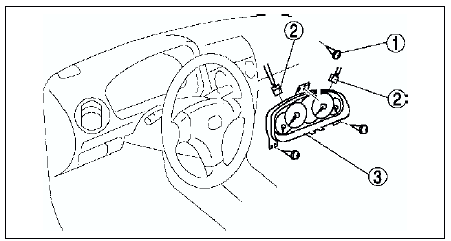
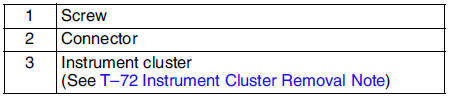
7. Install in the reverse order of removal.
Instrument Cluster Removal Note
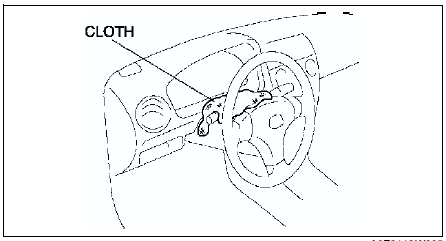
When removing the instrument cluster, in order to prevent damage to the lens, cover the steering shaft with a cloth.

 Instrument cluster configuration
1. Connect the SST (WDS or equivalent) to the DLC-2.
2. Input vehicle information following the directions on the screen.
3. Select Module programming.
4. Select Programmable module installation. ...
Other materials:
Mazda 6 Service Manual: Rear map light removal/installation
1. Disconnect the negative battery cable.
2. Remove in the order indicated in the table.
3. Install in the reverse order of removal.
Rear Map Light Removal Note
1. Insert a tape-wrapped flathead screwdriver into the gap between the
headliner and the rear map light.
2. Push the hooks to re ...
Mazda 6 Service Manual: Immobilizer system reprogram procedure
Note
When an error occurs during the reprogram procedures, except when
the PCM is replaced, repeat the procedure from Step 1. If you still cannot
reprogram, confirm how many keys can start the engine. Then, perform the key
replacement or addition reprogram procedure according to the val ...