
Mazda 6 Service Manual: Pid/data monitor and record procedure
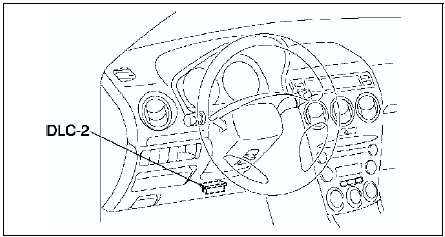
1. Connect SST
(WDS or equivalent) to the vehicle DLC-2 16-pin connector.
2. Access and monitor PIDs using SST
(WDS or equivalent).
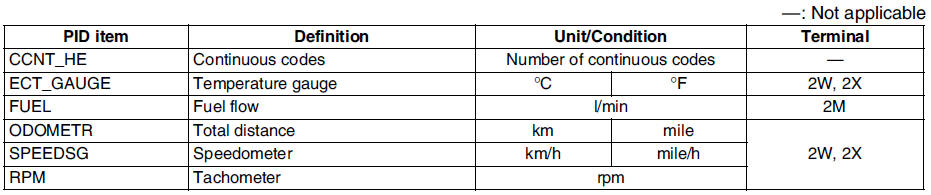
Monitor Item Table
- The PID/DATA monitoring items for the instrument cluster is as shown in the table below.
 Instrument cluster input/output check mode
Note
In this mode, it is possible to check the items in the following
chart.
Diagnostic Trouble Code Chart
Note
Diagnostic trouble codes which are not listed may be indicated,
but ...
 Fuel gauge sender unit inspection
Move the float to the topmost and bottommost positions, and verify that the
resistance between terminals A and B of the unit and the position of the float
are as indicated in the figure.
If th ...
Other materials:
Mazda 6 Service Manual: Front shock absorber disposal
Warning
Whenever drilling into a shock absorber, wear protective eye wear.
The gas in the shock absorber is pressurized, and could spray metal chips
into the eyes and face when drilling.
1. Clamp a shock absorber on a flat surface or with the piston pointing
downwards.
2. Drill a 2-3 ...
Mazda 6 Service Manual: Replacing Interior Light Bulbs
Overhead lights/Front map lights (LED type), Rear map lights (LED type)
The LED bulb cannot be replaced as a single unit because it is an integrated
unit. The LED bulb has to be replaced with the unit. We recommend an Authorized
Mazda Dealer when the replacement is necessary.
Overhead lights/F ...