
Mazda 6 Service Manual: Input/turbine speed sensor inspection
Caution
- Water or foreign objects entering the connector can cause a poor connection or corrosion. Be sure not to drop water or foreign objects on the connector when disconnecting it.
1. Disconnect the negative battery cable.
2. Remove the battery and battery tray.
3. Remove the air cleaner component. (See INTAKE-AIR SYSTEM REMOVAL/INSTALLATION.)
4. Disconnect the input/turbine speed sensor connector.
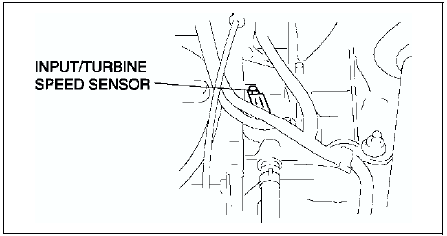
5. Measure resistance between the terminals of the input/turbine speed sensor.
- If not as specified, replace the input/turbine speed sensor.
Resistance
250-600 ohms (ATF temperature: -40-160 °C {-40-320 ° F})
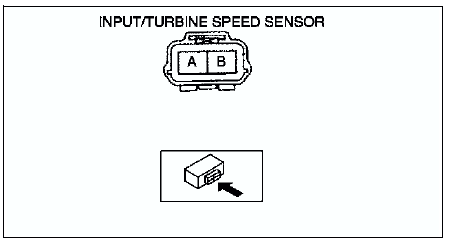
6. Connect the input/turbine speed sensor connector.
7. Install the air cleaner component. (See INTAKE-AIR SYSTEM REMOVAL/INSTALLATION.)
8. Install the battery and battery tray.
9. Connect the negative battery cable.
 Oil pressure switch removal/installation
Warning
When the transaxle and ATF are hot, they can badly burn. Turn off
the engine and wait untill they are cool before replacing ATF.
1. Disconnect the negative battery cable.
2. Remove ...
 Input/turbine speed sensor removal/installation
1. Disconnect the negative battery cable.
2. Remove the battery and battery tray.
3. Remove the air cleaner component. (See INTAKE-AIR SYSTEM
REMOVAL/INSTALLATION.)
4. Disconnect the input/turbin ...
Other materials:
Mazda 6 Service Manual: Rear upper arm removal/installation
Caution
Performing the following procedures without first removing the ABS
wheel-speed sensor may possibly cause an open circuit in the harness if it
is pulled by mistake. Before performing the following procedures, remove the
ABS wheel-speed sensor (axle side) and fix it to an appropri ...
Mazda 6 Service Manual: Front crossmember removal/installation
1. Remove the under cover.
2. Remove the splash shield.
3. Remove the front auto leveling sensor. (See FRONT AUTO LEVELING SENSOR
REMOVAL/INSTALLATION.)
4. Remove the transverse member. (See TRANSVERSE MEMBER
REMOVAL/INSTALLATION.)
5. Remove the steering gear and linkage, and pipe assembly i ...