
Mazda 6 Service Manual: Dtc c1194, c1198, c1210, c1214, c1242, c1246, c1250, c1254, c1400, c1410, c1957, c1958

Diagnostic procedure
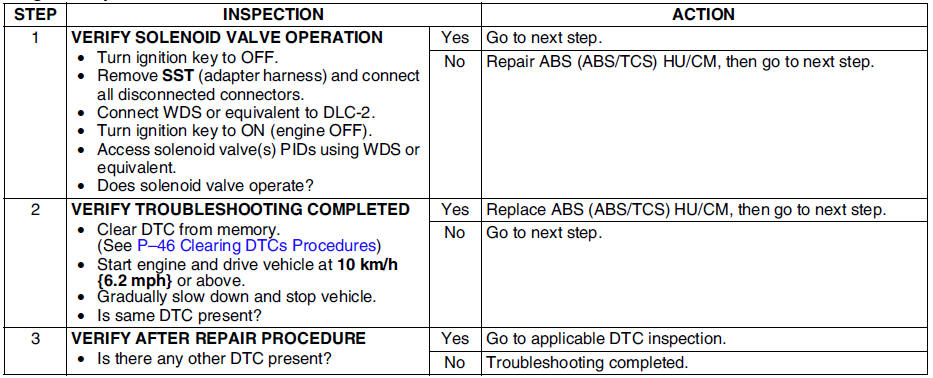
 Dtc c1186, c1266
Caution
When attaching the tester lead to the ABS (ABS/TCS) HU/CM
harnesses connector the SST (49 G066 001) must be used. (See ABS (ABS/TCS)
HU/CM INSPECTION.)
Diagnostic procedure
...
 Dtc c1414
Diagnostic procedure
...
Other materials:
Mazda 6 Service Manual: Abs (abs/tcs) hu/cm removal/installation
Caution
When replacing the ABS (ABS/TCS) HU/CM, configuration procedure
must be done before removing the ABS (ABS/TCS) HU/CM. If configuration is
not completed before removing the ABS (ABS/TCS) HU/CM, TCS will not work
properly (with TCS model).
Do not drop the ABS (ABS/TCS) HU/CM. Re ...
Mazda 6 Service Manual: Immobilizer system reprogram procedure
Note
When an error occurs during the reprogram procedures, except when
the PCM is replaced, repeat the procedure from Step 1. If you still cannot
reprogram, confirm how many keys can start the engine. Then, perform the key
replacement or addition reprogram procedure according to the val ...