
Mazda 6 Owners Manual: Shift-Lock Override
If the selector lever will not move from P using the proper shift procedure, continue to hold down the brake pedal.
1. Remove the shift-lock override cover using a cloth-wrapped flat head screwdriver.
2. Insert a screwdriver and push it down.
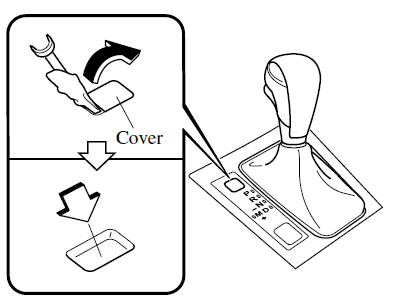
3. Press and hold the lock-release button.
4. Move the selector lever.
Take the vehicle to an Authorized Mazda Dealer to have the system checked.
 Shift-Lock System
The shift-lock system prevents shifting out of P unless the brake pedal is depressed.
To shift from P:
1. Depress and hold the brake pedal.
2. Start the engine.
3. Press and hold the lock-release ...
 Transaxle Ranges
The shift position indicator light in the instrument cluster illuminates.
The selector lever must be in P or N to operate the starter.
P (Park)
P locks the transaxle and prevents the front wh ...
Other materials:
Mazda 6 Owners Manual: Traffic Sign Recognition System (TSR) (Some models)
The Traffic Sign Recognition System (TSR) helps prevent the driver from overlooking
traffic signs, and provides support for safer driving by displaying traffic signs
on the active driving display which are recognized by the Forward Sensing Camera
(FSC) or recorded in the navigation system whil ...
Mazda 6 Owners Manual: Wheel hub, hub spindle pre-inspection
Wheel Bearing Play Inspection
1. Position a dial indicator against the wheel hub.
2. Push and pull the wheel hub by hand in the axial direction and measure the
wheel bearing play.
Maximum wheel bearing play
0.05 mm {0.002 in}
3. If the bearing play exceeds the specification, replace a ...